


Clearer search results and API replies
Clean snippets, a real relevance score, a flag for searches with no good match, the same order for the same search, and API errors that browser code can read.
- Published
- Updated
Highlights
- Snippets keep code intact and leave out page buttons such as "Copy page".
- The result score is now a real relevance value from 0 to 1, instead of position only.
- Each reply flags when no page matches the query, and you can ask for an empty list in that case.
- Repeated searches return the same order and run faster.
- Browser code can read every Search API error, and more path prefix forms work.
Sujal Goel opens in a new tab recently tested Ceisium Search across the Next.js docs and sent us a thorough report. His testing caught real rough edges in our snippets, scoring, ordering, and API error replies, so this update fixes all of them.
Existing projects get these fixes automatically, without any changes to your API calls or project settings.
Clean snippets
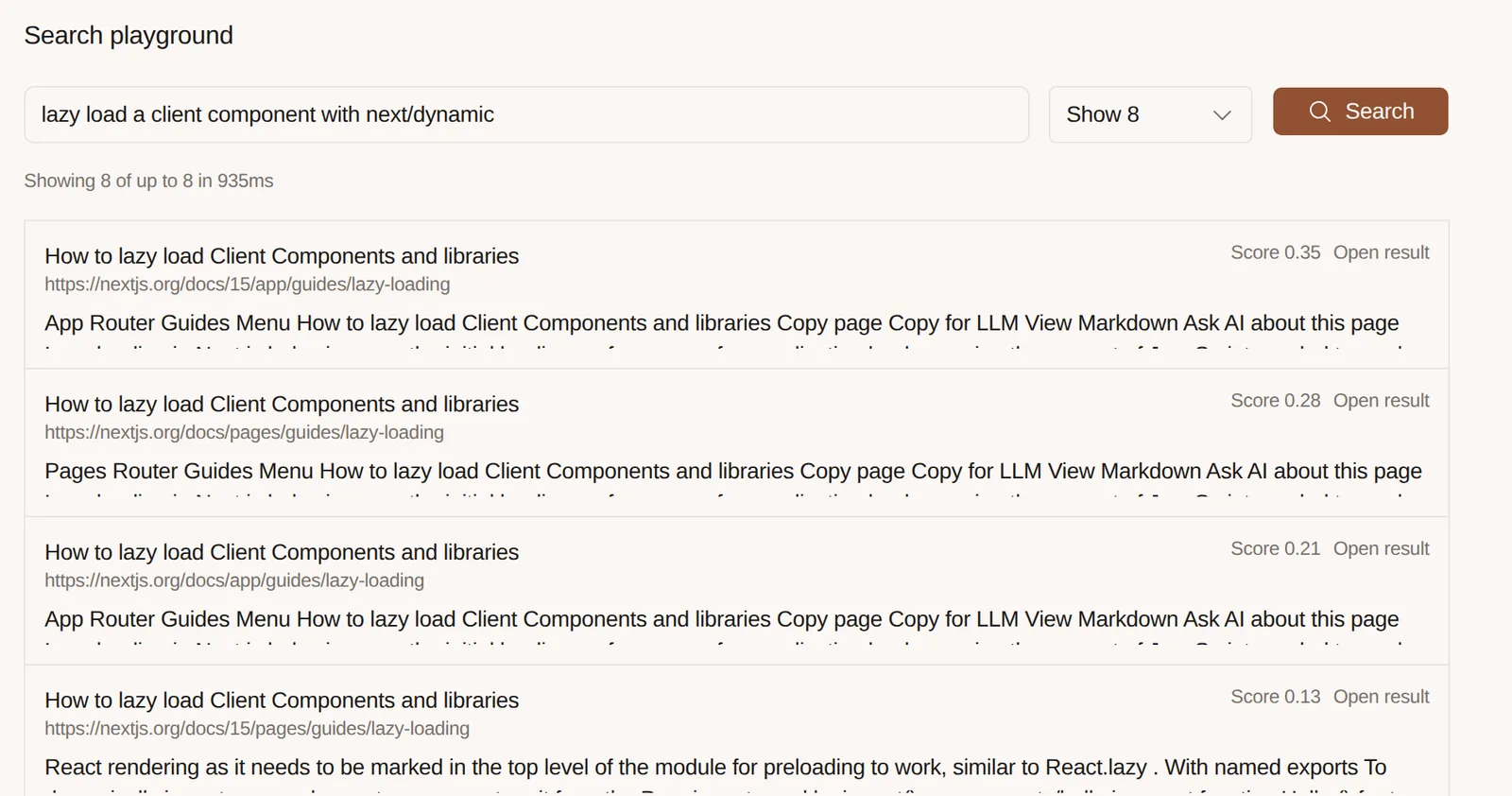
Snippets used to pick up extra spaces around code and pull in page controls, so we cleaned up how the crawler extracts text.
- Code keeps its spacing, so
dynamic(() =>stays intact instead ofdynamic ( () =>, andNext.jsstaysNext.js. - Page controls such as Menu, Copy page, and Ask AI about this page no longer show up in your snippets.
Here is how results looked in an index built before this update:
And here is the same search after the fix:
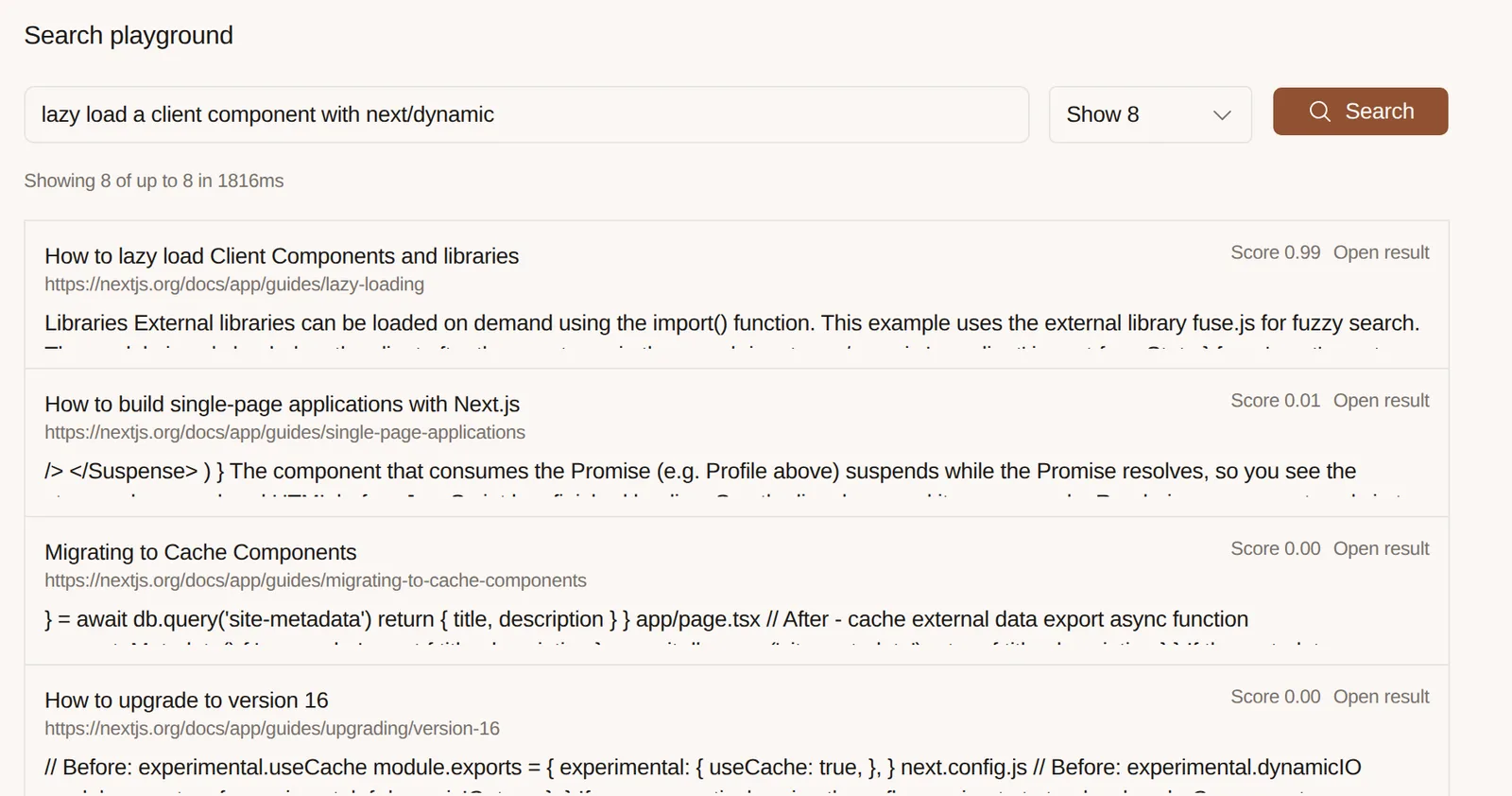
Your next crawl will re-read each page once and refresh your snippets automatically.
A real relevance score
Before this update, score only reflected result position (1, 0.5, 0.33, and so on), so even a query with no real answer got 1.
Now score is a 0 to 1 value showing the reranker’s confidence that a page is the best match among the pages it compared. If the reranker is unavailable, score falls back to text matching on the same scale, and scores never rise down the list.
| Search on the Next.js docs | Scores |
|---|---|
| environment variables | 1, 0, 0, 0, 0 |
| what is the capital of france | 0.41, 0.14, 0.09, 0.06, 0.05 |
A low top score is a hint that no page fits well, and you can use no_match when you want a direct signal.
Know when no page matches
Search used to return results even when your site had nothing relevant to say. On the Next.js docs, asking for “best pizza recipe” brought back the JSON-LD guide at the top.
Now every search reply includes a no_match field so your app can handle off-topic queries cleanly:
true: none of the top results answer the query, so it is likely off-topic for your site.false: the check did not flag the query as off-topic, though this does not guarantee a page fully answers it.null: the check did not run, for example when the reranker was unavailable.
You can use no_match to show an empty state, or pass exclude_no_match: true to get an empty results list when nothing matches:
{ "project_id": "prj_example", "query": "best pizza recipe", "exclude_no_match": true }When no_match is true, passing exclude_no_match: true returns results: [] while still counting as one search in your usage. When no_match is false or null, your results still come back as usual, and the option is off by default.
Because the reranker checks this in the same call that ranks your pages, search latency stays the same. In our test on the Next.js docs, it flagged 48 of 50 off-topic queries and 0 of 1,000 real docs questions.
The same order for the same search
Running the same search twice used to shuffle results, and 5 runs of “environment variables” could come back in 4 different orders. Now the same query returns the same results in the same order.
Ceisium Search now caches the reranker’s order for up to 7 days, which also speeds up repeat queries. In our test, a repeated search dropped from about 850 ms to about 160 ms. Results can still change when a new crawl updates your pages or after the saved order expires.
Narrow path_prefix searches return full results
When you scope a search to a small section of your site, Ceisium Search now pulls candidates from inside that prefix first. Searching “caching” under https://nextjs.org/docs/app/api-reference/functions/ used to return only 3 results, and now it returns 20 pages from that folder.
Errors your browser code can read
Every Search API error now includes CORS headers, so browser code can read the real status and message instead of a generic network error.
const response = await fetch("https://api.ceisium.com/v1/search", { method: "POST", headers, body });if (!response.ok) { const error = await response.json().catch(() => null); console.warn(response.status, error?.detail);}We also tightened a few error replies so invalid requests fail clearly:
429replies now includeRetry-Afterwith the seconds left in the current rate-limit window.- A blank query with only spaces returns
422“query is required” instead of running a search. - Passing a number or array for
queryreturns422“query must be a string”, while text like"404"still works. - Sending
GET /v1/searchreturns405withAllow: POST, OPTIONS.
More path_prefix forms work
Browser keys with allowed URL prefixes are now more forgiving of small formatting differences:
https://nextjs.org(without a trailing slash) andhttps://NEXTJS.ORG/both matchhttps://nextjs.org/.- When a key has only one allowed prefix, omitting
path_prefixuses that prefix automatically.
Requests for other sites or wider prefixes are still blocked.
effective_top_k in each reply
Every search key caps results per query (20 by default), so replies now include effective_top_k to show the limit used. If you ask for 50 results with a 20-result key, the reply reports effective_top_k: 20.
The simplest intent-aware search for your website and docs
Compare your website's search with Ceisium Search for free